
Skip to content
Cookies and this website

This website uses cookies to give you the best online experience. If you'd like to know more please read our cookie policy

Click here to review our cookie policy

Some cookies may record information such as location for analytics purposes. You may click to consent to our processing as described in the cookie policy. Alternatively you may click to refuse to consent or access more detailed information in the cookie policy. Please note that some processing of your personal data may not require your consent. Your preferences will apply to this website only.

Accept Reject

NewcastleHomes.org.uk

Scheme logo
  • Register
  • Login
  • Mobile view
  • Accessibility
  • Help
  • Properties and recent lets search
  • My to do list
Close(Close the to do list)

My to do list

This feature is only available to registered users
  • Click here to login if you have already registered
  • Click here to register if you are new
  • Home
  • About Us
    • About Us
    • Contact Us
    • Registered Providers
    • Our Policies
    • Local Lettings Policies
    • Equal Opportunities
  • Your Application
    • Your Application
    • Scheme Summary
    • How to Apply
    • Who Can Apply
    • Eligibility
    • Qualification
    • Local Connection
    • Priority Bands
    • Reviews and Appeals
    • Bidding for Properties
    • Adapted and Accessible Properties
    • Shortlisting
    • How to Login
    • How to Reset Your Password
    • How to Request Your Login Reference
    • Supporting Information
    • Immigration Status Check
    • How to Upload Documents
    • Change of Circumstances
    • Update Your Application
    • Annual Renewal
    • Closing Your Application
  • Housing Options
    • Housing Options
    • Information and Advice
    • Social Housing Waiting Times
    • Mutual Exchange
    • Newcastle Private Rented Service
    • Homelessness
    • Older People
    • Disabled People
    • Young People
    • Supported Accommodation
    • Veterans
    • Low-Cost Home Ownership
    • Housing in Other Areas
    • Moving Home
  • Key Housing Facts
You are here
  • Home
  • Your Application
  • How to Login

How to Login

Topics

Skip to the page content
  • Scheme Summary
  • How to Apply
  • Who Can Apply
  • Eligibility
  • Qualification
  • Local Connection
  • Priority Bands
  • Reviews and Appeals
  • Bidding for Properties
  • Adapted and Accessible Properties
  • Shortlisting
  • How to Login
    • Problems Logging In
  • How to Reset Your Password
  • How to Request Your Login Reference
  • Supporting Information
  • Immigration Status Check
  • How to Upload Documents
  • Change of Circumstances
  • Update Your Application
  • Annual Renewal
  • Closing Your Application

How to Login - Step-by-Step


Step 1

Select 'Login' in the top right hand corner. If you click here the Login page will open in a new window.
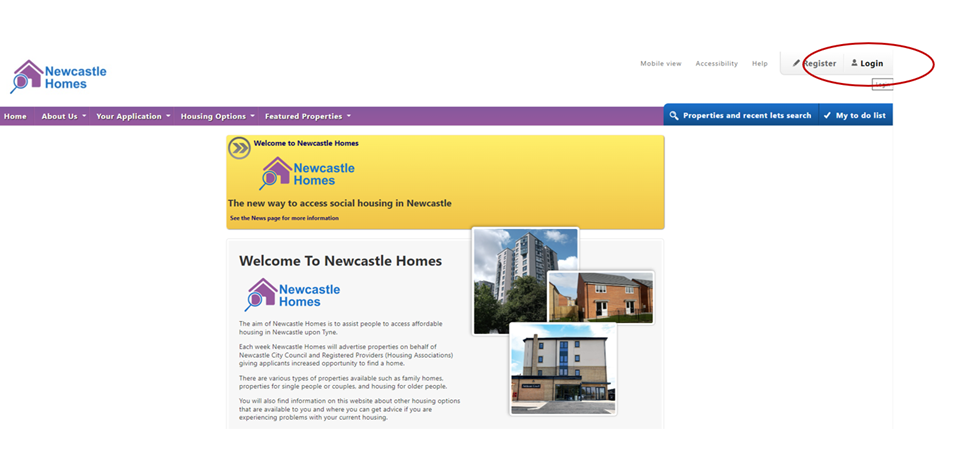
Image demonstrating step one


Step 2

Enter your login reference number and click continue.
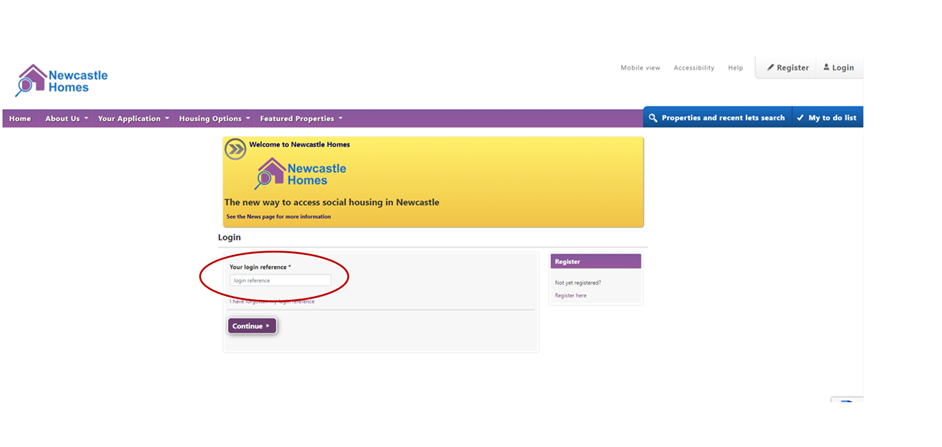
Image demonstrating step two


Step 3

Enter your memorable date and password and click continue.
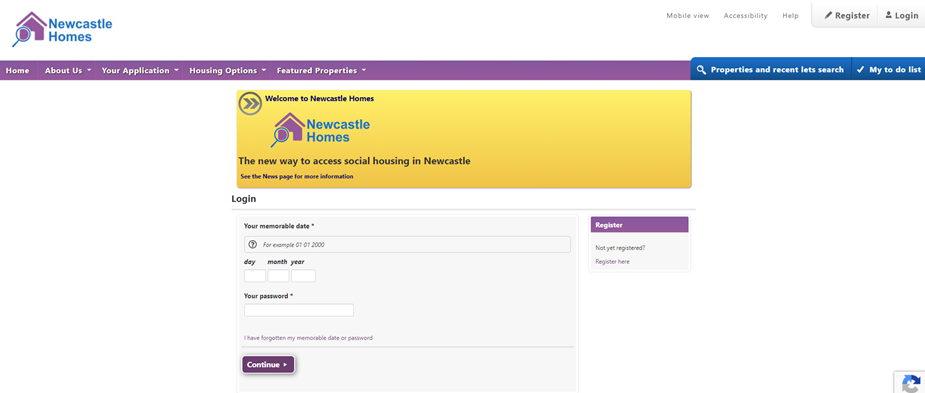
Image demonstrating step three


Shortlisting
Problems Logging In
  • Privacy Notice
  • Cookie Policy
  • Site map
© Copyright Civica UK Limited 2017
Loading...please wait...

An error has occured

An error occured while processing your request, please try again.

Success